$10
MB MixHead Companion (BC Patchwork preset)
⚡️ A Smarter Way To Use MB MixHead ⚡️
Ever wished you could dial in MB MixHead at unity gain?
Well now you can with the MB MixHead Companion!
MB MixHead is a powerful tape emulation processor, but it has a few minor issues that make using it a little difficult...
❌ No linked input and output
❌ No level compensated Drive knob
❌ Hidden "Hard Clip" button
❌ Redundant "Active" and Power controls
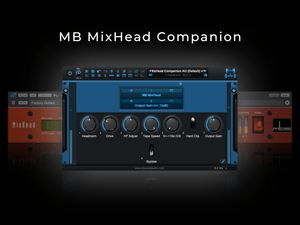
MB MixHead Companion solves this by adding the following new features:
✅ A headroom knob (links the input and output knobs)
✅ A level-compensated Drive knob
✅ Exposes the hidden "Hard Clip" button
✅ Links the redundant "Active" and Power buttons to a unified bypass switch
✅ Ability to finely adjust all plugin parameters using the arrow keys
✅ Includes custom startup presets that measure perfectly flat
System Compatibility:
- MacOS 12 Monterey and above (Intel & Apple Silicon)
- Windows 10 (64-bit) and above
Host Compatibility:
- Any DAW running Blue Cat's PatchWork v2.75 or later
Plugin Requirements (AU or VST3):
How do I use the MB MixHead Companion?
You can either use MB MixHead exactly as you've been using it, or via Patchwork's macros - each mapped to all the same parameters, but with some added benefits as listed above.
I recommend sticking with Patchwork's controls, and with MB MixHead visible - which is how these presets load up by default. (If you ever want to hide MB MixHead or re-position it upon loading a preset, you can do so, and then save/overwrite the Patchwork preset).
Files included:
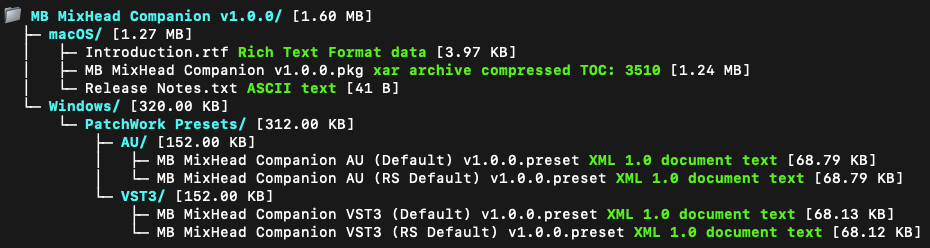
Includes a convenient pkg installer for macOS, or preset files for Windows/manual install
Important MB MixHead bugs to note:
The AU version's "Tape Speed" macro in Patchwork does not currently toggle through the 30ips setting. Only 15ips and 3.75ips will be selected when adjusting this parameter. This is not an issue in with VST3 plugin. If using the AU version and want to toggle on the 30ips speed, please use the plugin GUI, or stick with the VST3 version until Metric Halo provides a fix. (The 30ips Tape Speed setting is also not possible to automate in Ableton using the AU plugin, confirming that this is a bug on Metric Halo's end).
Conversely, the VST3 version does not expose the oversampling parameter in Patchwork, so this parameter does not exist here. To change oversampling when using the VST3 preset, please use the plugin's GUI to change this, or start from the "RS Default" presets which are oversampled 16x by default.
Release Notes:
v1.0.0:
- Initial Release
Returns & Exchanges
Due to the nature of this digital product, returns are not possible unfortunately. However, I am committed to providing exceptional support for all purchases. If you have any questions or issues, please reach out with your transaction ID and I'll be happy to assist.
We hope these "companion" presets help make using this plugin a little easier!
Enjoy!
Say goodbye to average vocals
Questions or want to request a demo ?
Sign up to our newsletter
Join our community and get the latest tips, deals and product updates straight to your inbox. 🔒 We will never send spam or share your information