UAD Plugins Tool ChangeLog
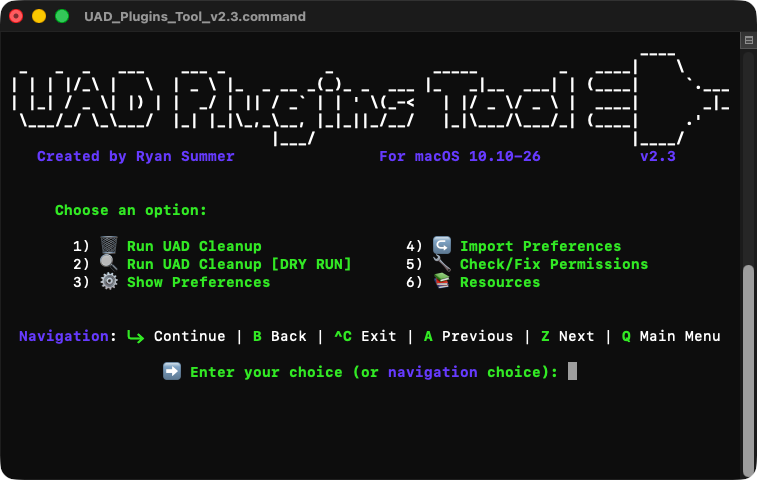
See product: UAD Plugins Tool
v2.3:
- ✅ Tested & compatibile in macOS Tahoe 26.3.1 (Update: works in 26.4 too)
- New A/Z navigation controls: You can now cycle through all menu options by choosing ‘A’ for previous, or ‘Z’ for next. (This works either at the main menu or in any submenu).
- Updated UI: new headers, new navigation prompt, centered text, condensed menu options
- In addition to displaying previous steps/submenus (under most headers) - for example: ‘↩️ Main Menu’, next steps/submenus will now be shown where applicable - for example: ‘Start Cleanup ↪️’.
- Renamed ‘📚 UAD Resources’ to just ‘📚 Resources’
- Dropped two menu items: ‘🔄 Check For Updates’ and ‘📝 ChangeLog’, which are now added as options (🔗 Links) in ‘📚 Resources’
- Updated the latest UAD_11_8_3_321.pkg download link in 📚 Resources
- New in ↪️ Import Preferences:
• After importing preferences, it will now display a confirmation of the number of plugins set for removal/keeping, total number of UAD plugins, and whether there were any new plugin titles added to the list
• Added new Path Picker options:
- 1) 📂 Reveal Finder (for Drag & Drop)
- 2) 📄 Choose file (via Finder dialog)
- (Or use the existing drag & drop functionality in the same window)
• implemented safeguards if accidentally choosing a file that is not a UAD Plugins Tool command file
the backup file now gets the extension ‘_backup.command’ instead of ‘.command_backup.command’. (Note that there’s no current workaround to preserve the new command file’s icon/metadata. Only fix is to manually re-set it via Get Info. The Image ‘.UAD Plugins Tool Icon.png’ can be found in the UAD Plugins Tool folder for those who want to preserve the icon. To unhide it, press '⇧ + ⌘ + .')
- Refined ^C behavior when interrupting cleanup, dry run or show preferences
v2.2:
- Added support for UAD Software v11.8.2
- Added 'UAD elysia alpha compressor V2' and 'UAD SPL Vitalizer MK3-T' to the
plugin list
- Removed the built-in changelog 🥲 The menu option now opens this page in your browser.
v2.1:
- Added support for macOS Tahoe 26.0.1
- Added two new menu options:
· 6) 🔧 Check/Fix Permissions
· 7) 📚 UAD Resources
- Implemented a permissions check (and optional fix) for cases where a user
account may not 'own' plugins directories or have write access to move plugins
- the new 📚 UAD Resources menu option provides quick links to download the
latest UAD Software '.pkg' installer (not easily accessible anymore), download
previous installers, check the UAD release notes, or run the uninstaller.
- Now automatically cleans up the UAD_Backup folder (that gets created on the
desktop) if no plugins were moved - and if nothing exists in the subfolders.
- Removed UAD MDWEQ5 from the plugin list. This extra PDF is now removed auto-
matically when both MDWEQ5-3B & MDWEQ5-5B are uncommented in the plugin list.
- Fixed auto-resizing resulting in unintended window dimensions while Terminal's
font size was set to anything other than '14'.
- Added auto-resize support for iTerm
- Added auto-resize support for 4k resolutions (now maxes out screen's height)
- Various other visual enhancements, fixes and optimizations
v2.0:
- NEW: Redesigned UAD Plugins Tool + implemented the following menu options:
· 1) 🗑️ Run UAD Cleanup - Main cleanup operation
· 2) 🔍 UAD Cleanup [DRY RUN] - Test what will be removed and kept!
· 3) ⚙️ Show Preferences - Shows your current preferences with a ✅ or ❌
· 4) ↪️ Import Preferences - easily merge your old UAD Plugins Tool prefs into
this new script, as well as future versions of UAD Plugins Tool!
· 5) 🔄 Check For Updates - instantly opens up the UAD PT landing page
in your browser
· 6) 📝 ChangeLog - see the latest changes and improvements
- added support for UAD Software v11.8.1
- added the new 'Maag EQ4 MS' to the plugin list
- added the new 'Shadow Hills Mastering Compressor Class A' to the plugin list
v1.1.4:
- added menu to script
- added support for UAD Software v11.7.1
v1.1.3:
- removed the comments from the 'function prep' command in the instructions as
this was giving errors when using in terminal
- added support for macOS Sequoia 15.5
- added support for Apple Silicon
v1.1.2:
- added support for UAD Software v11.7.0
- added the new 'UAD A-Type Multiband Enhancer' to the list of plugins
- added an icon to the .command file
v1.1.1:
- changed the extension of the script to .command instead of a .sh in order to
run it simply by double clicking it
- added a safety confirmation requiring a 'y' or 'n' to prevent running by
accident
- added instructions on de-quarantining the script so that it's not
automatically blocked by Apple's gatekeeper (due to me not yet being in the
paid Apple Developer Program.)
- simplified, clarified & colorized text output
- Updated testing info for macOS Sequoia and UAD Software v11.6.0
v1.1.0:
- completely redesigned the script to move unused plugins rather than search and
permanently delete them. (This allows for the process to run in seconds rather
than minutes. Unused plugins now get moved to a folder on the the desktop
called 'UAD_Backup' which contains the following subfolders: AAX, Component,
Documentation, VST, VST_Mono & VST3).
- removed the function to delete the UAD uninstaller, as it's file size is negl-
igible and may help users properly clean up UAD files if they need to use this
- removed the need to comment out plugin titles under the documentation section
in the script. (This is now handled by the section under '# List of plugin
names')
- edited Instructions.txt to reflect this new implementation
v1.0.1:
- This update includes time-saving optimizations for searching in plugin folders
with thousands of plugins.
- Adds '/Universal Audio' to directory paths to reduce overall search time
- Creates a temporary 'Universal Audio' directory for Audio Unit's to avoid
searching all plugins in the Components directory
v1.0.0:
- Initial Release
Questions?



Sign up to our newsletter
Join our community and get the latest tips, deals and product updates straight to your inbox. 🔒 We will never send spam or share your information